I guess I’m not actually over halfway through then!
I guess I’m not actually over halfway through then!
Are there “only” 8896 items total? I counted 8897 in the script. I must be off by one…
I updated the script accordingly, since I’d hate for @Naphthalene to not get to 100% next week 
aw ye I can still say I’m at level 42


It’s this one 
Yup, Firefox ships with the Twemoji Mozilla font, which is based on Twitters’ Twemoji.
Made me realize I wasn’t using my system default. I now have the shiny Google Noto star.

Passed the halfway point now!

Nice to have an overall metric to track your progress beyond your WaniKani level. Seeing the score go up after each review session is pretty motivating and means I don’t have to wait a whole week (or however long it takes to level) to get that much-needed serotonin kick.
Glad to hear that! That was my goal 
Congrats at passing the half way point!
This is a nice idea thank you! I was pleased to see that while my wife and I are on the same level I am one star ahead of her… 
Discovered Wanikani very early in my Japanese learning, started properly when we bought lifetime subscriptions in the Dec 2017 sale. Have been plodding along steadily with it since then while making sure to devote time to grammar, reading, listening etc.

Installed the script and wondered how come it didn’t show the rating. Did my evening lessons, when…

Interesting script!

Well, my progress is almost same as my level, time to move on! 
I wish I’d found this sooner, would be fun to see what the number was when I hit lvl 42 with zero burns 
Last Screenshot of zero burns
First Screen shot I have after reaching 42, but also after getting my first burns… I forgot to do one at lvl 42 with zero D=
Edit:
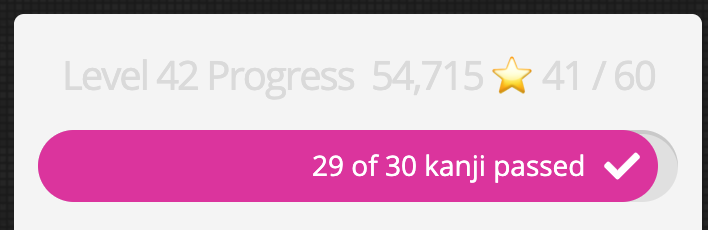
41/60, while at lvl 42, time to go!!
I’m not sure what you mean?
This is what it looks like normally:

Funnily enough, while I waited for the site to fully load to take that screengrab, the real score blinked into place while all the scripts were getting loaded, only to vanish again.
What script is the one you’re using to show the burns?
Change the order in which the scripts load. Real score adds information to the level progress panel and the Dashboard level progress detail replaces that same panel’s contents, erasing the info real score added. Real score should load/run after the level progress detail script.