Lesson Filter does this, although I don’t think in the same spot you’re referring to? In any case, you can set a batch size without filtering any items and that should work. Sounds like it’s a good fit for the workflow you describe too.
Sweet! I’d been scared to install Lesson Filter given self control but that’s perfect for what I’m doing, thank you for the recommendation 
Anyone know if there is a script to display the ‘Lesson batch sizing’ setting on the dashboard? I often change the number of lessons to match remaining kanji, vocab, etc and being able to quickly set it (from the page top navbar for example) rather than clicking into profile > app would be very handy.
1 Like
The lesson filter script lets you control the batch size from the review page. Maybe that is good enough for your purpose.
2 Likes
Perfect. Thank you!
1 Like
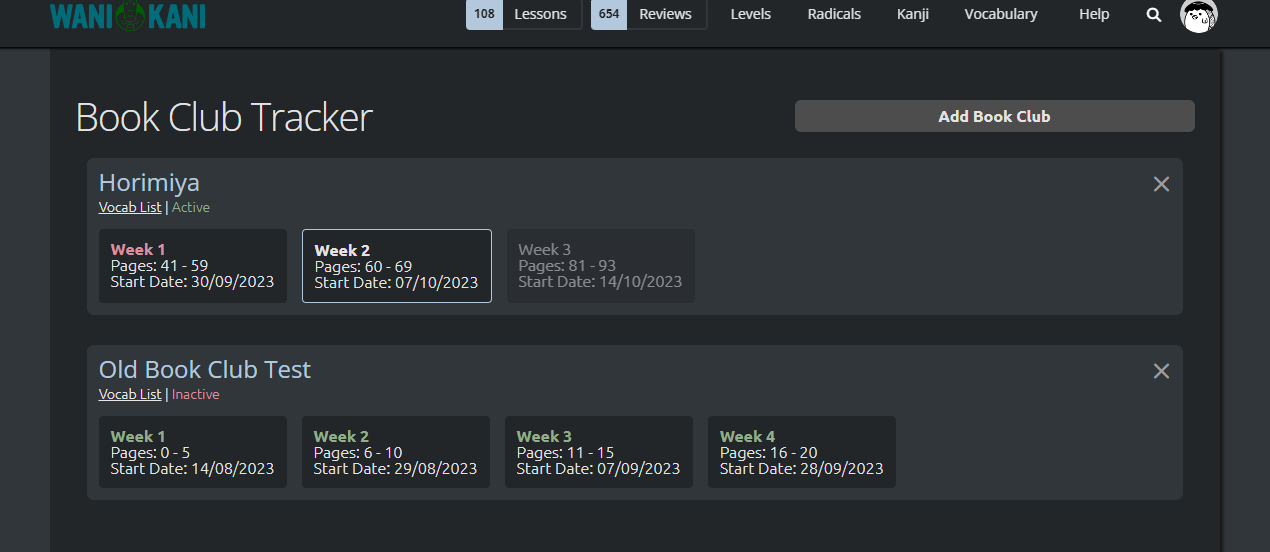
Distracting myself from my 600 reviews by an idea I had for a book club tracking script  We’ll see how it turns out - still very WIP…
2 Likes
Aha, when the inspiration bug hits and you can’t ignore it x3
That’s awesome though, I think that would be an incredibly helpful script. Will there be a way to mark a week as read/unread so you can keep track not just of where the book club is at but where you are in it as well?
On the note of 600 reviews though, I have to say Reorder Omega’s Backlog preset was a huge help for me to get through my own several hundred strong review pile back when I was coming back to wanikani after a long break and no vacation mode. It did still take 30 minutes or so per session (since it was 100 items per session), but as long as I stuck to “if I don’t know it within 10 seconds and don’t get a feeling of ‘it’s on the tip of my tongue, I know it’ then I’ll enter something wrong, check the right answer, and move on” things went rather smoothly.
Ah, but I did also use omega to separate out Apprentice and Guru reviews from Master and Enlightened reviews; I did Appr and Guru like they weren’t part of the backlog, then once I had none of those left I would do the backlog preset on the remaining Master+Enlightened pile. This let me put off the Master+Enlightened pile until I felt I was in the mood for it and had the half hour to commit to doing it. Then once I finally hit 0 it was a weight off my shoulders and I didn’t even really need omega for reviews anymore (instead I use it for some light lesson reordering now).
1 Like
Ye, it does already have that (clicking the week toggles between red/green text, or white/green if it’s the active week) but I’m trying to work out how to make it more obvious - maybe some kind of checkbox somewhere…
I’m currently working on adding a button to it on the dashboard, deciding what image I want on it! 

If you have any more ideas for it please feel free to let me know!
I do need to work on sticking to this - I usually do but occasionally get stuck on a word for 10-25 seconds, which does slow me down… A big thing for me is just finding the motivation to do more than 40-50 reviews in a day, which is much harder to find when there’s still going to be a few hundred reviews left afterwards rather than a nice 0!
Maybe going the route of email and using open/closed envelope icons? With colors on the icons to match the color scheme you’re doing currently?
Oh definitely that’s a struggle. That’s why it was so important that I separate the Apprentice and Guru items from the Master and Enlightened ones (and at some point I made the separation “All But Enlightened” as that was really where the hundreds of reviews were concentrated). I had far fewer of the lower SRS items, so it was easier to get through all of them and feel accomplished for the day and only then decide if I wanted to engage with the bigger pile when the motivation struck. It took a few weeks but I did get through it and once I did it was much easier to settle into a routine so I wouldn’t lapse again. Now, even though I can at times have over 100 reviews in a day due to my pacing (which I got to very slowly, not starting out at this pace right away), it doesn’t feel like a lot because they’re spread out across the day and each session takes at most 5 minutes to do.
1 Like
Is anyone aware of a tool that shows progress on the Levels/Radicals/Kanji/Vocab pages? I’d like to be able to go to the Kanji page and see at a glance which I have to Guru and Master level already without having to click on each one and scroll all the way to the bottom.
Example of what I’m thinking of:

2 Likes
I’m curious if there’s a way to stop the review additions when doing reviews.
Like being in vacation mode but also allowing reviews to be done.
Hey Alu, I often set a time limit for myself to do my reviews and my biggest issue is that sometimes I’d be sitting on something that I have just learned for like a good 20 seconds which adds up to a lot when you have around 300+ reviews a day, I would like to know if there is or that you could make a script that’ll fail the item automatically if I’ve been taking more than for example 10 seconds reviewing it?
Also, of course I will compensate you if you are able to code something like that.
1 Like
Perhaps I’m not getting what you mean by “…mark an answer as wrong.” I’m using WK override and when I want to do what you want, I simply ‘backspace’ and deliberately type in a wrong answer.
Wouldn’t this accomplish what you want?
Auto-filling with supposedly wrong answer after 10 seconds is pretty easy. It doesn’t auto-submit though.
1 Like
That’s fine I just need something let’s me know if 10 seconds, or 15 seconds has passed so I can move onto to the next item.
Maybe 5 sec is enough?
1 Like
If it’s not, there is a variable at the beginning “TIMEOUT_SECONDS”, changing the 5 there to 10 should work
1 Like
Yes (renamed to TIMEUP_SECONDS).
Damn that is exactly what I was looking for and it was created 2 hrs ago? By any chance did you make this script?
Works like a charm, thank you sir
1 Like