I will try to help you.
What are your Wanikani vocabs? I assume you want to export all those you have learned so far. Here is a procedure.
First step: set up a table that will contain all the vocab you have learned so far. You go to the settings by clicking the settings button.

Then you need to create a table that will select the items you have learned so far.
- You must go to the Tables tab.
- Create the table tab by clicking on the new button.
- Gives the table a meaningful name, like Export to Anki.

Then you must set filters that will select the right items, otherwise you will export everything in Wanikani.
- Go to the Filters tab.
- Click on SRS level and select all the levels except Initiate and Unlocked.
- Click on Item Type and select vocabulary.

These filters will select all the vocabulary you have learned so far. If you clicked Initiate and Unlocked you would get items you haven’t learned yet. If you also want the kanji, click on kanji as well in Item Type. I think it would be a good idea to study the kanji as well, so feel free to go ahead.
You can check what you have selected by exiting the settings and checking which items are displayed. If you are happy with with you see you may proceed to the next step.
To export you need to select which information goes in the export file.
- Go to the export tab and select the information you want exported.
- In the data format section use the defaults.
- the exception is URL Clickable where you should use HTML for Anki.
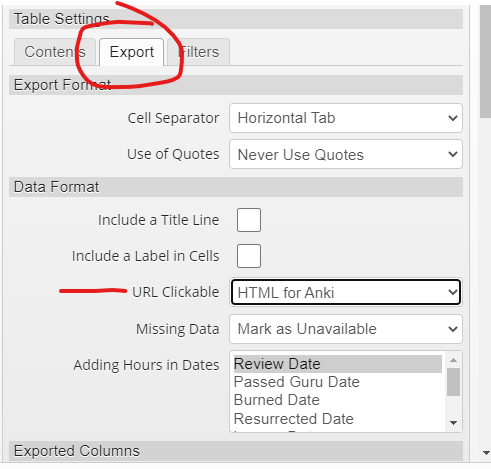
You also need to select which information will go in your Anki card. The minimum is Item, Meaning Brief and Reading brief. You may also select the URL for Item Page. This will insert in your Anki card a link to the Wanikani Item Page. If you want to consult the mnemonics or your notes in the WK item page you click on this link to get there.

You may add more information on an Anki card but for a starter this should do.
Then you need to perform the actual export. You click on this button.

A menu will show up. For Anki you click on Download. A csv file will download that you can import in Anki.