This is a third-party script and is not created by the WaniKani team. By using this, you understand that it can stop working at any time or be discontinued indefinitely.
Some WK users want the ability to remove certain items from their review queue, so I created this userscript:
(General script installation instructions)
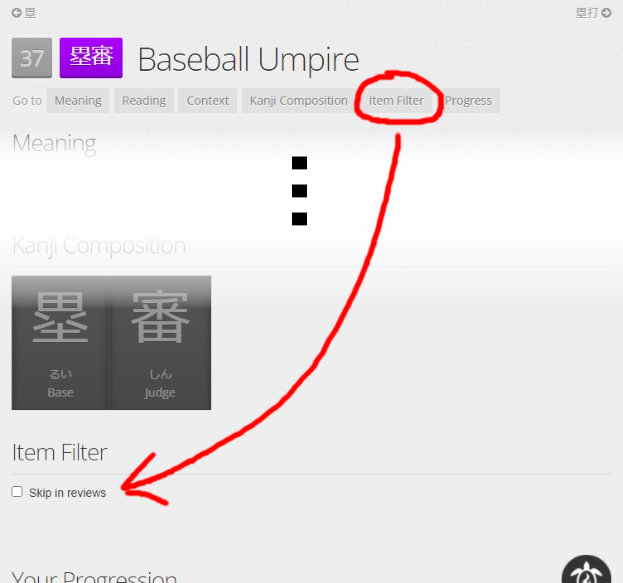
This script adds a checkbox “Skip in reviews” to every WaniKani item (in lessons, reviews, and on item pages). When starting a review session that contains checked items, a popup asks whether the checked items should be removed from this review session. They won’t appear in the current review session but still remain in the review queue so that they can be done later.
For items that should not stay in the review queue when being skipped, there is a second checkbox “Automatically pass review when skipping”. When starting a review session that contains any such “auto-pass items”, a popup asks whether these items should be immediately answered correctly. To suppress this confirmation dialog, there is a third checkbox with the global setting “Finish all auto-pass items without confirmation prompt”. Please only use this feature after careful consideration.
The selection of filtered items is stored in the localStorage of the webbrowser and won’t sync across browsers/devices. The selection is also not separated by WaniKani account, so if you share your PC and webbrowser with another person who also uses WaniKani, their reviews will also be filtered!
Could you implement an option so items are marked correct instead of left for later? For people who don’t want to deal with some vocab… ever. 
Now there are two checkboxes: After checking “Skip in reviews”, a second checkbox “Automatically pass review when skipping” appears. Reviews for items with this checkbox checked are immediately marked correct when they are skipped.
Oh thanks so much!  Now is a good idea to rename the thread, something like “Item NSFW Filter / Trigger Blacklist” because people look for these keywords, most of the time. And the original thread literally requested nsfw mode as in, for work
However I’d implement the behavior like this. A filtered checkbox and two radio buttons are available.
- Items such kintama and butts are NSFW and left for later. So a pop-up asks if we should filter them now = basically asking if you are home or at work.
- Items like self-decide are triggers and always (regardless of nsfw decision! so no pop-up if no items in first list!) auto-solved till burned. I only request this behavior because uh these are triggers the mere existence of such list should be reminded of as less as possible.
(or not just triggers, pesky words that people choose to ignore forever so we don’t see any homesick(rip) or fugu threads again) (not every person struggles to squash every leech don’t start on me people)
So what do you think? Could you implement it like this, please?
I intentionally chose a very general script name that only describes what the script does and left out any suggestions what it might be used for – that’s up to the users to decide. Searching for “NSFW filter” or “userscript NSFW” already returns this thread, which I think should be good enough.
I see, the problem is that if someone wants to use this script both for occasionally delaying certain reviews and also for auto-solving certain other reviews, there is no easy way to solve the auto-pass items without also delaying the other filtered items. I have now added a second confirmation popup that separately asks whether auto-pass items should be solved. Since auto-pass is a rather drastic action, having it performed silently while just skipping other items was probably not the best design anyway. Now the user gets properly informed/asked.
For this use-case, where the user explicitly does not want to be informed/asked, I have added a setting (another checkbox) “Finish all auto-pass items without confirmation prompt”. In contrast to the first two checkboxes, this is a global setting that affects all auto-pass items – I didn’t want to introduce a WaniKani Open Framework dependency just for adding a proper settings menu, so it’s another checkbox.
Furthermore, I still wanted the settings interface to reflect the severity of the impact on the learning process, so the more severe settings are still hidden at first. After enabling filtering, the user can go one step further and auto-pass items, and finally even disable the confirmation so that these reviews are solved silently.
This gives me the option to skip these items, but it is not making them as correct, even though I have it checked. Am I doing something wrong? Also, I just tried the skip without confirmation thing, and I still got the pop-up before the reviews, and only the one to skip, not to mark correct.
Thanks for the update! But I tested the script and sadly…
on 0.3 skipping works but auto-pass does not.
on 0.4 skipping works and auto-pass still does nothing, third box checked or not. (with third box checked it still gives a pop-up)
The only other script affecting my reviews is Reorder Ultimate, I turned it off but nothing changed. I have 3 items to review, 2 vocab and 1 kanji, I tested all checkboxes on that kanji, it shows 2 vocab items left while in session (if I chose OK in pop-up), but when I finish it (clicking home button) there’s still 3 items left to review, kanji only got skipped but never auto-passed. And yeah it only ever gives the skipping pop-up, not the solving one.
I’m willing to provide screenshots, logs etc. (sorry for not testing 0.3 earlier, I had a pile of reviews, now I have a smaller one for testing)
Sorry, I forgot to test the auto-pass functionality with WK compatibility mode. Version 0.5 should now work for both compatibility mode on/off.
Tested all 3 boxes and it works in all use cases I came up with! 2 pop-ups or 1 or 0, filtering and solving and silent solving, all as intended. Thank you very much.
Will you edit the Scripts Wiki post to include this one, in reviews section? I think it shows that English is not my mother tongue and my wording is weird. I don’t want to mess up the short description.
Oh almost forgot, could you please move the checkboxes to bottom in lessons/reviews session pages. My eyes dash for meaning but now it’s a section down.
Done.
Done. I have moved the “Item Filter” section to the bottom on every page because it’s not supposed to be a frequently used section.
Have you considered making a WKOF filter out of this? If you did it could be used with Reorder Omega in a preset
I don’t know much about WKOF filters, but I could look into it so that the filter can also be used in Reorder Omega. However, what could the filter be used for? I can’t think of a use case yet.
Sorry, I misunderstood how the script worked. I didn’t realize it was a skip for the current session only. If it had been one of those scripts that skips items permanently it could have been used to only filter them out for certain presets. With that someone could have made a SFW preset, for example
The problem is that Reorder Omega filters items after they are already loaded, when the first review is already on the screen. So it can’t entirely replace this script’s functionality, because there is a chance that the problematic item is the first in the queue, which would still be visible for a second before Reorder Omega applies its preset. To avoid this, this script modifies the queue fetch, so that the problematic items will never even reach WK code.
And when extra study was released, I decided to reuse this idea to create Extra Study: Burned Items, because this method seemed easier than modifying the queues in jStorage. However, to make this method compatible to the Reorder Omega Self Study (and also as a fallback when the queue fetch already happened before my script is injected), I now have added the jStorage method as well.
This is what I did with integrated custom srs, how did you make this reliable? My method was overriding ajax with a customer function, but that was very timing sensitive.
I didn’t. There is nothing I can do if my script is executed after the queue fetch already happened. That’s why the additional fallback to manipulating the jStorage was somewhat necessary anyway.
I do the same thing – I wrap jQuery.getJSON() and window.fetch() with my own functions that alter the queue response.
For me, it always worked when I navigated to the review page from somewhere else, but it never worked when I just refreshed the review page.
Lol, I know that feeling, (This is why WICS is turning into an extension)
Curious, because this is a path I’m currently investigating. Have you tried overriding XMLHttpRequest.prototype.send instead? My main issue was with having to wait for jquery, but not long enough that the reviews kick in. Now theoretically you can override this even before any dom elements are down and jquery in the end boils down to a request like this. I’m getting promising results from a test I did, here’s some example code:
(function(send) {
  XMLHttpRequest.prototype.send = function (...sendArgs) {
    const callback = this.onreadystatechange;
    this.onreadystatechange = function(...stateChangeArgs) {
      if (this.readyState == 4) {
        var responseURL = this.responseURL;
        console.log(responseURL);
      }
      if (callback) {
        callback.apply(this, stateChangeArgs);
      }
    }
    send.apply(this, sendArgs);
  }
}(XMLHttpRequest.prototype.send));
Initially I just wanted to tamper with window.fetch(), but then I noticed that WK still uses jQuery.getJSON() during reviews and that jQuery does not use window.fetch() internally. However, I stopped at that point and just changed getJSON() instead of changing XMLHttpRequest.prototype.send().
I’m not sure if my code also has this problem – I create a setter for window.jQuery to immediately react once jQuery is defined (since I’m using a promise, it is not actually “immediately”, so I’m not 100% certain that it is guaranteed to work; furthermore, this approach will fail if another script also decides to tamper with window.jQuery). Maybe I will switch to the XMLHttpRequest.prototype.send() method at some point in the future.
I tried out your code snippet, but I had to use this.addEventListener("readystatechange", ...) instead of this.onreadystatechange = ... for it to work correctly.