The see all section is fixed in 0.1.2, just released. For the level progress “you’ve passed this level”, could you do what I suggested to the other person in my last reply please? (i.e. right clicking, inspect, searching in the styles tab for background-color, etc)
@Hubbit200 Since you didn’t get an answer for the widgets yet, and I happen to have 2 additional questions, I’ll try to provide you with the screenshots you need. Hope, I got it right:
This is for the lesson widget, when the daily set goal is reached:
If these aren’t what you need, let me know and I’ll try to provide you with more information from my console view (even though I have no clue what I’m doing there ).
My 2 questions are:
Any chance to change the colors in the widgets regarding kanji & vocab to the yellow and green from the Breeze Dark 2? I mean these one’s:
The colors for the radicals and kanji while doing reviews are wrong, too. All 3 item types have the green for vocab. I assume this can be corrected, too?:
0.1.4 released with a couple more fixes, including to the style settings menu (removing now-redundant options, fixing the “Lessons/Reviews Size” setting, I’ll fix the other couple of broken ones soon)
Thank you for the fast updates!
There are still some wrong colors, but I’d say the only actual “important” thing is the reviews of radicals are still not in blue (now they’re yellow).
If you click in the level progress-widget on the kanji and vocab to see more details for the individual lessons, their backgrounds are still in light pink and light violet. The kanji/vocab text itself has the correct color (yellow resp green):
Support for the main parts of Dashboard Progress Plus 2 script (as far as I can see) @prouleau
Fixed colours for level progress widget @KUROKAT_art
Fixed a couple of things on radical pages
Haven’t managed to replicate the review forecast header background yet, it appears properly for me And same with the colours during reviews. I’ll keep looking…


 ).
).


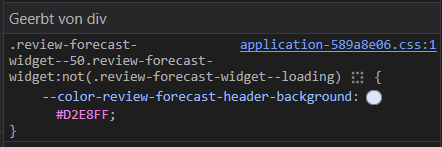


 And same with the colours during reviews. I’ll keep looking…


