[Userscript] Word Frequency Filter

General script installation guide
Open Framework installation
Install Word Frequency Filter

Purpose

This script allows you to easily select which words you care about at a given WK level and only learn those while ignoring the rest.

Learning all the vocabulary that WaniKani offers at each level isn’t necessarily useful. There are a lot of infrequently used words which ultimately just increase your daily review time without providing much immediate value.

While there are scripts that can give you kanji frequencies, there was no script that could do the same for words, so here it is.

Word frequency lists

The script comes with a number of frequency lists:

Each word in WK is annotated with its rank according to those lists (rounded to the next 100). Those ranks show up in various places:

Settings

In the settings popup you can decide which of the word lists to use as your main list. In addition to the lists themselves, you can choose between Best (use the best rank of all lists) and Average (use the average rank of all lists).

You can also choose whether to show word ranks during reviews.

Word grouping on the lesson picker

Words on the lesson picker are automatically reordered according to the selected rank. Lowest ranks appear first in the list. You can also set a rank cutoff in your settings which causes all words with a higher rank than the cutoff to be grouped into the “Beyond cutoff” section.

Marked words

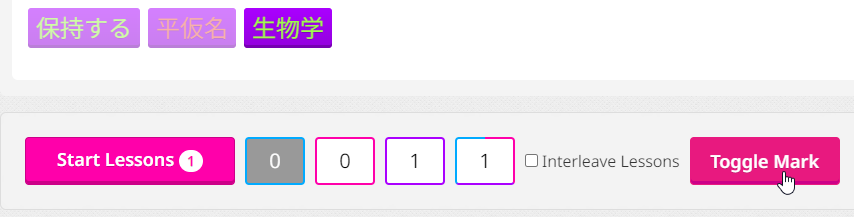
While using a frequency list is very useful, blindly relying on it is not recommended either. That’s why you can hover over each word to see its meaning and ranks. If you decide that you want to learn a word although it’s beyond the cutoff, but maybe you don’t want to learn it right now, you can just select it and click the Toggle Mark button which will put the word into the Marked section.
Other word lists

If you have any particular word lists that you’re using and that you’d like to see included in this script, please leave a comment and a link to the word list and I’ll see if I can add it.

But I’m not learning all the words…

When I started using this, I had this weird sense of FOMO when I saw words piling up that I wasn’t learning. But when I realized (with the help of the tooltips on the lesson picker) that most of the words weren’t immediately useful to me, my perception changed and now I’m very happy not to clutter my daily review time with words I don’t use.

Your experience might be similar. And if you do find that you need to learn a word that you’ve skipped earlier, you can always do it later! Just use WK’s search function and if the word turns up as unlocked, you know where to find it.

Other scripts

Note that this addon has synergies with two of my other addons which you might like:

  • Daily Vocab Planner
    If chosen in Daily Vocab Planner’s settings, only words below the cutoff, as well as marked words, are considered for your daily vocab progress and for calculating vocab unlocks.
  • Vocab Reading Analyzer
    The screenshots above were taken with this script active (which is why the vocab items are colored)!

For developers

The script exposes a wff object that contains these entries:

  • FrequencyData: A map of term → frequency data, e.g 板:{i:3,w:2251,a:6058}. Each frequency data object contains the term’s rank in the given word list. Each object has at least one rank but not necessarily all of them
  • getRank(data): Given a frequency data value from FrequencyData, return the rank according to the user’s settings
  • isMarked(subjectId): Given a subjectId, return whether the word was marked by the user

Feedback

I hope this is useful to you guys. Please let me know if you have any issues, feedback or feature requests in the comments.

Changelog

1.3.0: Tooltips in lessons and reviews; Ranks in reviews are optional
1.2.0: Show word rank on lesson and review pages
1.1.1: Annotate words on search page

Pretty neat, even to just use as a quick reference to the various frequency lists for each new vocab as you’re learning them.

1.1.1: Annotate words on search page as well

Would it be possible to also display the frequency info on the lesson and review pages?
For reviews, somewhere in the top section without having to expand the “item info” section during reviews… (similar to how the pitch accent script works?)

There you go!

1.2.1: Show ranks on lesson & review pages

Thanks!
It works as advertised :slight_smile:
That is, showing the top ranking. Would be cool if it could show full info on these pages like on the vocab page, but no big deal if that’s not possible or too messy to design.
It’s a very nifty script regardless :grin:

Having the ranking visible makes me feel a little better when I fail a review for some less frequent item (nice!) but also a little worse when it’s a frequent one (oh, well! :slight_smile: )

I would personally like a way to hide the frequency information during reviews, because it feels like it could end up forming an association with the item in one’s memory in a way that’s detrimental to overall learning.

@cezarL @Inserio

Implemented both :slight_smile:

1.3.0: Tooltips in lessons and reviews; Ranks in reviews are optional

Thank you very much for making this. Sorry if it’s a dumb question, but where are the settings located?

Open the WK Menu, then under Settings → Scripts there will be an entry for it.

Thank you so much !!

Looks like there’s a bug where the lesson picker tooltips don’t load properly if you navigate to the lesson picker from the main menu; they only load if you refresh the page while on the lesson picker. I fixed this by updating line 202 in the postNavigate function from:
annotateLessonPicker();
to
wkof.ready("ItemData").then(loadItems).then(annotateLessonPicker);
This insures that the item data is always loaded when navigating to the lesson picker.

I also noticed that “toggle mark” button will randomly duplicate. Doesn’t really effect functionality, but is a bit odd.

I can’t seem to look at the Innocent Corpus anymore

Routledge 5000 Vocab - Kanshudo I found this one which seems good though, seems like it would be useful for early levels

Is it possible that the (I think mostly aesthetic) changes to the lesson picker that were published today could have broken this script? It doesn’t seem to be working for me right now, but I don’t know enough about Computer Stuff to know whether to blame myself or something else…

Yup, it was broken by the most recent update. You can fix it by going into tamper monkey and updating the annotateLessonPicker function. For me that’s on line 428, but I’ve made changes to this file before so our line numbers could differ slightly. For simplicity, here’s the first 16 lines of the function that contains all the necessary changes (lines 428-444 for me). If you just copy this over the existing function (just the first 16 lines!) it should :crossed_fingers: work.

function annotateLessonPicker(isUpdate = false) {
    const subjectElements = document.querySelectorAll(".subject-character__characters-text");
    const rootsWithWordsBeyondCutoff = new Set();
    const rootsWithMarkedWords = new Set();
    const cutoff = shared.settings.rankCutoff;
    const MarkedOrder = 100000;
    const CutoffOrder = 200000;
    const CutoffOrderOtherRanks = 300000;
    const CutoffOrderNoData = 400000;
    for (let element of subjectElements) {
      const typeParent = element.parentElement.parentElement.parentElement;
      if (!typeParent.classList.contains("subject-character--vocabulary")) {
        continue;
      }
      const root = typeParent.parentElement;
      const subjectId = parseInt(root.getAttribute("data-subject-id"));
      const data = FrequencyData[element.innerHTML.replace('\n', '').trim()];
The specific changed lines

For full transparency, the only changed lines are the ones that start with: const subjectElements, const typeParent, and const data. Lines 429, 438, and 444 for me respectively.

The issue was that there were some slight structural changes in the html of the vocab containers. Nothing major but just enough to break the script lol.

Hope that’s helpful even for a non computer stuff knower!

That worked! You’re a rockstar, thank you!!

I wonder if a script like this exists for jlpt level

Thank you!!!

Im more than an idiot some days but where is the Settings pop-up? I cant seem to locate it.