Today’s a big day and represents the culmination of months of toodling about refactoring KameSame’s data model to enable more general purpose language study than merely being a mirror of WaniKani, without (a) stopping being that, or (b) sacrificing any of the speed or function of the study/quiz UI to do it.
Starting today, the lessons tab will kick off with lists to study words from. For now, there’s 1 list, based on the 10,000 most frequent words assembled by NINJAL. But soon after we’ll have JLPT N1-N5 vocab lists added. Eventually, we’ll add a KanjiDict import in addition to JMDict so that we can also have N1-N5 kanji lists to work from
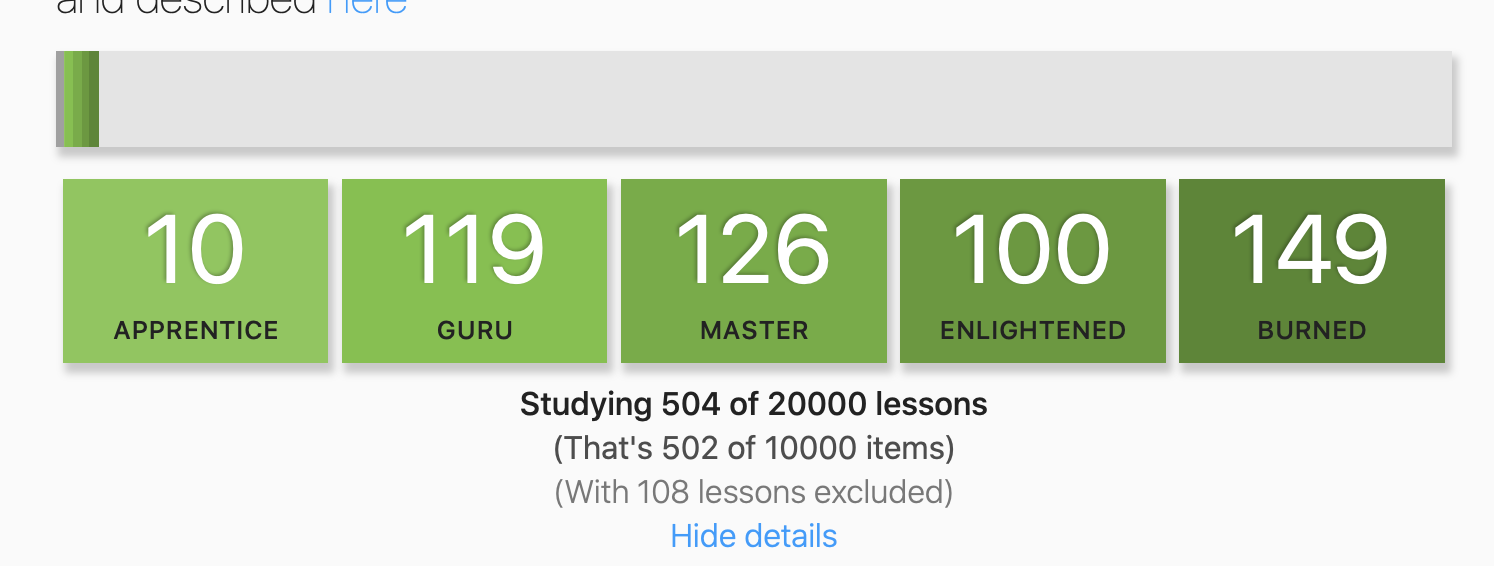
If you expand the details view, you can see just how many items you’ve started and their progress, to get a better idea of how close you are to completion:
I’m really excited about this and think it’s going to blow the doors wide open to people being able to use KameSame for general language study.
Future plans
Enable sign-ups without a WaniKani API key; require the key only to use the WaniKani lessons feature (which depends on your assignment status to determine unlocks)
Allow users to create custom lists
Allow users to report problems with lists (for now just email me)
Because I was having a good time and am generally a fun person I jumped right back in and added a shuffle feature to the lists:
This will do what it says on the tin and draw items for lessons in any order from the list, not just the natural ordering of the list (frequency, in this first one’s case)
It also asked me to learn 四 (JP to EN), even though I’ve already burned it in both WaniKani and KameSame (EN to JP). Perhaps now that KameSame is capable of going both ways, it should import the status of the cards in WaniKani for the JP to EN cards.
Thanks for pointing this out; this was a bug introduced last night and is now fixed.
Yeah, this is a good idea too. I think what would make the most sense is a new Danger Zone button that will update learning progress for all recognition of WaniKani-sourced items. It needs to be a point-in-time decision by the user, though (able to be re-synced manually), as the two will fall out of sync literally the next time a given word is reviewed in either app.
Just wanted to say how brilliant this app is, I recently started using it and I’m VERY delighted to see the 10k now. I was literally wondering whether I need an addtional resource to do the 10k the moment the site refreshed and it was there! Can’t believe I’ve been sleeping on both Wanikani and Kamesame.
I have also noticed another ‘bug’ similiar to the previously mentioned one:
when asked what the prefix お means, only entering Honorific/Polite/Humble Prefix will give me a correct. Isn’t there a way to reduce this to just saying “honorific prefix” (or any of the others?)
Yeah, it’s just the case that a lot of the JMDict definitions are not a great fit for the quiz yet. As we all work through these together, just add custom Definitions for the phrases you want like “Honorific” or “Honorific prefix” and I’ll triage/review them and mark good ones as “official” for the benefit of everyone
I recommend an option to have the WK cards sync regularly, and have the related production cards just be ignored in KS (as if they were blocked). That way, people like me who are using both simultaneously don’t end up quizzed twice on the same card, potentially messing up SRS timings.
To revisit this, I am also finding myself crutching in the same way that @Midnite had noticed - I receive a KS prompt like kanji:会, grunt, type 会う, and delete the う (edit: this isn’t really what Midnite described - it’s much worse!) The problem is that I lack discipline, and that needs to be - one way or the other - fixed on my end. But if you ever do want to revisit the idea of an optional hard mode, having two tab-able textboxes, one that requires the reading, and the other the kanji might be an option.
Thank you again for all your hard work on KS. I am excited to test out the new list options soon.
I watched your ‘The Selfish Programmer’ presentation Vimeo. I thought you really knocked it out of the park! TED level speech. I especially liked all the visuals, as someone with only a passing experience in programming it was really easy to follow. Very interesting.
Thank you so much for the kind words. I love using conference talks as an opportunity to reflect and distill what I’m learning and to whatever extent people find them useful and enjoyable brings me a tremendous amount of joy and fulfillment. Thanks!
It’s an amazing app but I’m having a problem with using it, it doesn’t update new kanji from WK. I have checked the API token. Do you have any idea what might be causing it?
A few people have mentioned wanting to avoid seeing any recognition lessons for any WaniKani items, because it would be duplicative from WaniKani. I can understand that (even though I personally prefer the extra practice, I’ve also already burned almost all of them). So I’m taking some time to make that work a little better if that’s your presence.
Starting today, you can set up account settings to disallow all recognition lessons for WaniKani items. Any reviews you have in flight will still show up normally, but it won’t start any new ones, whether initiated ad hoc, by scanning content, or working from a list.
The setting is in the account page:
And when it’s set, it has the side effect of also disabling the opt-in flag for including recognition items on the WaniKani lesson widget:
This is all quite confusing because of the double-negative and related-looking features, but I don’t see an easy way around it just yet, and wanted people to at least have the option of avoiding WaniKani recognition lessons for now



 Danger Zone
  )
)

