Have been using this script since a long time now. Thank you @saraqael for this awesome script!
The recent WK UI change made me remember that I did some changes to the script to allow for color gradients some while ago. I never really liked the colors of the original script (sorry saraqael  ), and thought some people might be interested too, so I share it here:


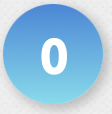



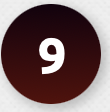
If you want the same style, you have to make the below changes to the script (current version 0.22).
Note that these are quick&dirty – that means, some settings like “glowing indicator” and “opacity” are still visible in the settings panel but have no effect anymore. Also, I didn’t consider decimals, but only full integers (you probably want to uncheck the “show decimals” setting, sorry for that…). So use these at your own will 
To get the same token style but with the same colors of the original script,
change line 72 to
const innerDiffDiv = (color, value) => `<div style="width: 24px; height: 24px; border-radius: 12px; margin: 13px; position: absolute; box-shadow: 0 0 6px 6px ${color}; opacity: 0.7${settings.GLOWING_INDICATOR && color != settings.DIFF_COLORS.null ? '' : '; display: none'}"></div><div style="width: 26px; height: 26px; background: ${color} !important; border-radius: 13px; margin: 12px; position: absolute"></div><div style="width: 30px; height: 18px; margin-left: 10px; margin-right: 10px; margin-top: 15px; position: absolute; text-align: center; vertical-align: middle; font-weight: bold; text-shadow: none; line-height: 1.3; font-size: 16px; color: ${color} !important; filter: brightness(${(settings.VALUE_OPACITY * 100).toFixed(0)}%) !important">${value}</div><div style="width: 50px; height: 50px; background: #5f5f5f !important; border-radius: 10px; box-shadow: 4px 4px 3px 1px rgba(0,0,0,0.3)${settings.BOX_INDICATOR ? '' : '; display: none'}"></div>`;
If you additionally want to have gradients and the same colors as me, you also need to do the following:
Change line 266 to
type: 'text',
and lines 31-37 to
    DIFF_COLORS: { // color codes for different difficulty levels
        null: '#fff', // used when no difficulty info is present (default: gray #7a7a7a)
        00:   'linear-gradient(180deg, rgba(56,134,218,1) 0%, rgba(109,221,238,1) 100%)', // 0.0 -  0.9: easy
        10:   'linear-gradient(180deg, rgba(119,223,97,1) 0%, rgba(105,221,183,1) 100%)', // 1.0 -  2.4: medium
        25:   'linear-gradient(180deg, rgba(243,171,61,1) 0%, rgba(249,216,73,1) 100%)', // 2.5 -  4.9: hard
        50:   'linear-gradient(180deg, rgba(235,66,73,1) 0%, rgba(238,119,50,1) 100%)', // 5.0 - 7.4: extreme
        75:   'linear-gradient(180deg, rgba(20,1,14,1) 0%, rgba(86,12,8,1) 100%)', // 7.5 - 10.0: hell
    },
The first change allows to specify a text input rather than fixing it to a color picker. It is necessary to specify gradients, but probably with some effort you can also code a color picker for gradients.
Again, it was a quick&dirty solution mostly designed for my purposes 
Likely the script will not pick up the gradients at first. That is because it uses the colors from your storage. To refresh it, just open the settings panel and click the “Reset Colors” button.