# Getting correct kanji with IME
**URL:** https://community.wanikani.com/t/getting-correct-kanji-with-ime/51085
**Category:** Questions
**Created:** [April 28, 2021, 9:43pm UTC](https://community.wanikani.com/t/getting-correct-kanji-with-ime/51085 "2021-04-28T21:43:43Z")
**Posts on this page:** 12
**Page:** 1
### Author:  [@anon18586075](https://community.wanikani.com/u/anon18586075)
#### Post date: [April 28, 2021, 9:43pm UTC](https://community.wanikani.com/t/getting-correct-kanji-with-ime/51085/1 "2021-04-28T21:43:43Z")
So I recently picked up KameSame after seeing it recommended around here for a while, but I ran into an immediate problem. That being that it’s become more of a struggle to get the correct kanji than it is to actually remember the correct answer. This, so far, has mostly been an issue for kanji questions (occasionally still with vocab).
For example, if it asks for the kanji for “strength”, I obviously want 強 and I type in "きょう”. But there’s obviously quite a bit of kanji with that reading plus all the other recommendations that the IME suggests that I now have to sift through to find what I want. I could obviously type it like 強調 or 強い and then just delete the extra kanji or okurigana, but that seems like unnecessary steps for something so simple.
I’ve spent a lot of time searching for a solution, but all the basic IME guides don’t really offer much help for this specific situation. Is there some function I’m just completely missing? Or is this just an inherent problem with the fact that I’m trying to type some kanji by themselves?
---
### Author:  [@Belthazar](https://community.wanikani.com/u/Belthazar)
#### Post date: [April 28, 2021, 10:01pm UTC](https://community.wanikani.com/t/getting-correct-kanji-with-ime/51085/2 "2021-04-28T22:01:52Z")
> [@anon18586075](#):
>
> I could obviously type it like 強調 or 強い and then just delete the extra kanji or okurigana, but that seems like unnecessary steps for something so simple.
That’s what you need to do. And honestly, つよい+backspace requires fewer keystrokes than きょう-space-space-space-space…
Writing many kanji in isolation is surprisingly non-trivial, and odds are you will never need to do it in the real world outside of KameSame. Context tells the IME what it is that you mean. For an analogy in English, imagine telling someone verbally to spell “they’re” - they’re either going to ask you for context, or else guess.
---
### Author:  [@Belthazar](https://community.wanikani.com/u/Belthazar)
#### Post date: [April 28, 2021, 10:26pm UTC](https://community.wanikani.com/t/getting-correct-kanji-with-ime/51085/4 "2021-04-28T22:26:19Z")
> [@anon18586075](#):
>
> I suppose I was more hoping that there was a function in the IME that would allow it to understand I’m trying to just get the kanji by itself
A function in the IME that’d, what… read your mind? That particular technology is still a little ways off. 😛
---
### Author:  [@seanblue](https://community.wanikani.com/u/seanblue)
#### Post date: [April 28, 2021, 10:30pm UTC](https://community.wanikani.com/t/getting-correct-kanji-with-ime/51085/5 "2021-04-28T22:30:36Z")
I think they’ve only just gotten “yes” and “no” to be understandable via fMRI. Selecting from among thousands of kanji is just a _little_ more complex than binary. 🙂
---
### Author:  [@QuackingShoe](https://community.wanikani.com/u/QuackingShoe)
#### Post date: [April 28, 2021, 10:53pm UTC](https://community.wanikani.com/t/getting-correct-kanji-with-ime/51085/6 "2021-04-28T22:53:48Z")
Well yeah, with that attitude!
---
### Author:  [@Belthazar](https://community.wanikani.com/u/Belthazar)
#### Post date: [April 28, 2021, 11:50pm UTC](https://community.wanikani.com/t/getting-correct-kanji-with-ime/51085/8 "2021-04-28T23:50:47Z")
Ah, no. Your problem is not that the IME can’t tell that you’re trying to type a single kanji. The problem is that there’s about three hundred kanji that can be read as きょう. And granted, probably the majority of those are not in common usage, but that’s still a lot of scrolling before you find the kanji you want, if you’re only going to identify it as きょう. That’s where the mind-reading comes in.
Typing a single kanji is easy. Typing the **right** kanji is hard.
---
### Author:  [@Leebo](https://community.wanikani.com/u/Leebo)
#### Post date: [April 29, 2021, 12:01am UTC](https://community.wanikani.com/t/getting-correct-kanji-with-ime/51085/10 "2021-04-29T00:01:17Z")
Even if it orders them by how frequently they appear, that won’t help much on a site like KameSame, where you need to type kanji with absolutely no correlation to how common they are.
And generally speaking IMEs order things by how frequently you type them, over time.
At the end of the day, doing what you’re describing on KameSame is not a thing most people need to do when using an IME.
EDIT: And @Belthazar notes that you might not be using the space dropdown? If that’s the case… then, yeah… that’s a basic function of IMEs and what I assumed you were already doing.
---
### Author:  [@Belthazar](https://community.wanikani.com/u/Belthazar)
#### Post date: [April 29, 2021, 12:02am UTC](https://community.wanikani.com/t/getting-correct-kanji-with-ime/51085/11 "2021-04-29T00:02:26Z")
Because in the real world, there are **very** few situations in which you’d need to. In the real world, you type words, not kanji. And yeah, you’re still gonna have to sort through homophones sometimes, but for the most part, it’s easier.
That said, I’m slightly wondering if you’re confusing auto-complete with the IME. When I type using the Windows IME, it first pops up with the list of auto-complete suggestions:
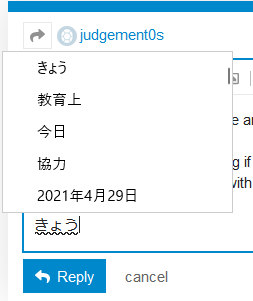
When I hit space a couple of times, though, **then** it comes up with the list of all possible options, which (as you can see) are mostly single kanji.

The IME definitely preferences more common kanji, and I slightly suspect that it gives a higher weighting to kanji that **you** use more often (though not certain on that), but since it’s all possible options, that’s a lot of options.
---
### Author:  [@Mrs\_Diss](https://community.wanikani.com/u/Mrs_Diss)
#### Post date: [April 29, 2021, 12:42am UTC](https://community.wanikani.com/t/getting-correct-kanji-with-ime/51085/13 "2021-04-29T00:42:29Z")
the problem really is that some sounds have an inordinate number of kanji attached to them, and telling your IME that you’re inputing single kanji won’t solve that.
i’m on a mac and use the built-in IME. it shows me the kanji and/or words and/or expressions which correspond to what i typed. it only very rarely proposes an autocomplete. so if the onyomi of a kanji is e.g. kou, then it will have to suggest a list.
the list is sorted by frequency though, and modified by how often i use a given kanji.
but in the end if you don’t want to scroll through long lists, typing in a word which uses the kanji is probably faster.
(i don’t mind scrolling through the lists of kanji. it shows me how fast i’ve gotten at recognising kanji 😉 )
---
### Author:  [@alo](https://community.wanikani.com/u/alo)
#### Post date: [April 29, 2021, 12:42am UTC](https://community.wanikani.com/t/getting-correct-kanji-with-ime/51085/14 "2021-04-29T00:42:43Z")
> [@anon18586075](#):
>
> for a single kanji and order by modern common occurrence
Let’s say it does do this in the way you want right now. In 6 months you’re still going to have to scroll when you want to type a single kanji from, say, level 40.
I agree though. The mind reading bit would be nice.
Here on the forums if I need to enter a single kanji I either type a word I know and delete or go to Jisho/WK and copy/paste.
---
### Author:  [@Belthazar](https://community.wanikani.com/u/Belthazar)
#### Post date: [April 29, 2021, 12:51am UTC](https://community.wanikani.com/t/getting-correct-kanji-with-ime/51085/15 "2021-04-29T00:51:32Z")
> [@anon18586075](#):
>
> “Its an easy feature and its Google, so why not?”
I don’t think I want Google to **ever** have the ability to know what kanji I’m thinking of. 😛
---
### Author:  [@system](https://community.wanikani.com/u/system)
#### Post date: [April 29, 2022, 12:51am UTC](https://community.wanikani.com/t/getting-correct-kanji-with-ime/51085/16 "2022-04-29T00:51:46Z")
This topic was automatically closed 365 days after the last reply. New replies are no longer allowed.