# Can't find some Kanji
**URL:** https://community.wanikani.com/t/cant-find-some-kanji/56569
**Category:** Japanese Language
**Created:** [April 12, 2022, 1:33pm UTC](https://community.wanikani.com/t/cant-find-some-kanji/56569 "2022-04-12T13:33:44Z")
**Posts on this page:** 20
**Page:** 1
### Author:  [@Warrie](https://community.wanikani.com/u/Warrie)
#### Post date: [April 12, 2022, 1:33pm UTC](https://community.wanikani.com/t/cant-find-some-kanji/56569/1 "2022-04-12T13:33:44Z")
Hi, I also use Kamesame to learn the words in reverse order. I use Windows 10 with the Japanese keyboard setting.
Normally I type in a word, press space and I get a list of possible Kanji’s to chose from.
That works great most of the time, but sometimes… the correct Kanji simply isn’t in the list.
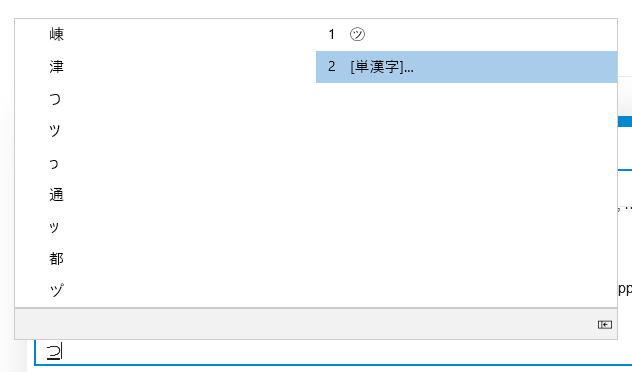
For example I now have to enter the Kanji for attach. I type in TSU and get a list of around 10 kanji to chose from… but not the correct one.
Anybody have an idea how I can fix this?
---
### Author:  [@Belthazar](https://community.wanikani.com/u/Belthazar)
#### Post date: [April 12, 2022, 1:34pm UTC](https://community.wanikani.com/t/cant-find-some-kanji/56569/2 "2022-04-12T13:34:47Z")
Type whole words at a time rather than individual kanji readings. Like つける to get 付ける. Delete the extra okurigana that comes with it.
---
### Author:  [@Thud](https://community.wanikani.com/u/Thud)
#### Post date: [April 12, 2022, 1:47pm UTC](https://community.wanikani.com/t/cant-find-some-kanji/56569/3 "2022-04-12T13:47:06Z")
Either know in which compound word you use it or try to type a verb. Yeah that can be a different reading, but you’re asked to produce something, the reading is not as important there.
Do pay attention to pick the right kanji though, as there are many homonyms that might show up first still.
---
### Author:  [@Warrie](https://community.wanikani.com/u/Warrie)
#### Post date: [April 12, 2022, 4:28pm UTC](https://community.wanikani.com/t/cant-find-some-kanji/56569/4 "2022-04-12T16:28:53Z")
Cheers, that works 🙂 It’s just weird that for some words I get a list of maybe 40 kanji and for this example, ‘Attach’, I get a list of only a handfull of Kanji without the correct one. But yes, typing in a word and then deleting the extra okurigana works, thx.
---
### Author:  [@Rrwrex](https://community.wanikani.com/u/Rrwrex)
#### Post date: [April 12, 2022, 5:55pm UTC](https://community.wanikani.com/t/cant-find-some-kanji/56569/5 "2022-04-12T17:55:02Z")
> [@Belthazar](#):
>
> Type whole words at a time rather than individual kanji readings. Like つける to get 付ける.
I remember asking my Japanese native wife a similar question, asking how she’d enter something to get a particular character out of her IME and getting the exact same response. Along with a puzzled and mildly dismissive eye-roll implying “How else would you do it? Isn’t that obvious?”
As non-natives we are accustomed to “pressing this to get that” as efficiently as possible. Any sort of two-steps-forward-one-back process to get what you want seems bizarre and vaguely irritating. There must be a better way! But natives apparently take it in stride without even thinking about it.
I still harbor unvoiced suspicions in the quiet, secret part of my inner dialog, but I’m wise enough to _leave_ them unvoiced in her presence.
There are positive dividends to this bizarre input method: simply typing “maru” to get ◯ for example. Mostly it still weirds me out, though.
---
### Author:  [@Warrie](https://community.wanikani.com/u/Warrie)
#### Post date: [April 12, 2022, 7:44pm UTC](https://community.wanikani.com/t/cant-find-some-kanji/56569/6 "2022-04-12T19:44:11Z")
Well if your wife says so then we will probably just have to accept it just works this way 😉
After some more googling I did find another way - in this example when you type ‘tsu’ and press space for the kanji list, press the downkey until 2 more kanji appear. Then on the last one press enter… and a whole new list opens, including the correct one. But typing a word and then deleting the last characters is easier indeed than doing it this way.
You have a nice way with words btw, ever though of a writing career? 🙂
---
### Author:  [@Belthazar](https://community.wanikani.com/u/Belthazar)
#### Post date: [April 12, 2022, 8:47pm UTC](https://community.wanikani.com/t/cant-find-some-kanji/56569/7 "2022-04-12T20:47:54Z")
> [@Rrwrex](#):
>
> As non-natives we are accustomed to “pressing this to get that” as efficiently as possible.
It ain’t about efficiency, it’s about specificity. How do you type, for example, one of the eleventy-one characters that’s read as こう or しょう?
“I want こう, please”
Ok, here’s all the characters which are read as こう
“Oh, uh… I meant the こう that’s used in 講師”
Well there it is, that’s how you be specific. Why didn’t you just say so the first time?
> [@Rrwrex](#):
>
> There are positive dividends to this bizarre input method: simply typing “maru” to get ◯ for example.
Or you can type かお and get \(゜ロ\)ココハドコ? (/ロ゜)/アタシハダアレ?
🙂
---
### Author:  [@GearAid](https://community.wanikani.com/u/GearAid)
#### Post date: [April 12, 2022, 9:13pm UTC](https://community.wanikani.com/t/cant-find-some-kanji/56569/8 "2022-04-12T21:13:33Z")
I have this problem as well but in kind of a different way? I can type the full word and still not get the kanji for it
Or in rare cases I’ve typed say うそ, tried to select the kanji, and then have it be displayed as a ?. But then when I copy and paste it from the internet, it stays.
I tried looking it up and it said to change the IME settings to display all options. (Like [here](https://www.pc-spark.jp/?p=1415)) I tried doing that, but it didn’t solve anything.
Sometimes I think my Windows is just doomed. I have my system language set to Japanese. All the options are in Japanese. And yet if I open a Japanese program, sometimes text on buttons and stuff will display like u#247agffmfe
Maybe it’s cause I use BootCamp? Idk
---
### Author:  [@GearAid](https://community.wanikani.com/u/GearAid)
#### Post date: [April 12, 2022, 9:15pm UTC](https://community.wanikani.com/t/cant-find-some-kanji/56569/9 "2022-04-12T21:15:55Z")
> [@Belthazar](#):
>
> Or you can type かお and get \(゜ロ\)ココハドコ? (/ロ゜)/アタシハダアレ?
Yeah totally
That’s how I get emoji on my phone since I have the emoji keyboard turned off
For Kaomoji I like Simeji since it has so many crazy options
---
### Author:  [@Rrwrex](https://community.wanikani.com/u/Rrwrex)
#### Post date: [April 12, 2022, 9:29pm UTC](https://community.wanikani.com/t/cant-find-some-kanji/56569/10 "2022-04-12T21:29:28Z")
I’ll just leave this here and back slowly away:
[](https://live.staticflickr.com/65535/50173162906_bc39390a75_o.jpg)
---
### Author:  [@anon9242278](https://community.wanikani.com/u/anon9242278)
#### Post date: [April 12, 2022, 9:32pm UTC](https://community.wanikani.com/t/cant-find-some-kanji/56569/11 "2022-04-12T21:32:07Z")
How is this not the standard?
---
### Author:  [@Belthazar](https://community.wanikani.com/u/Belthazar)
#### Post date: [April 12, 2022, 9:32pm UTC](https://community.wanikani.com/t/cant-find-some-kanji/56569/12 "2022-04-12T21:32:59Z")
Well, it **was** the standard. They’ve come up with a better idea since then, though. It’s called “IME”. 😛
---
### Author:  [@alo](https://community.wanikani.com/u/alo)
#### Post date: [April 12, 2022, 9:33pm UTC](https://community.wanikani.com/t/cant-find-some-kanji/56569/13 "2022-04-12T21:33:23Z")
> [@Rrwrex](#):
>
> simply typing “maru” to get ◯ for example
In English I get ⭕ for “circle” so I guess it checks out. Might just be an IOS thing though.
---
### Author:  [@anon9242278](https://community.wanikani.com/u/anon9242278)
#### Post date: [April 12, 2022, 9:36pm UTC](https://community.wanikani.com/t/cant-find-some-kanji/56569/14 "2022-04-12T21:36:02Z")
What? How is that better? Nope, I want this layout on my phone with a Blackberry style physical keyboard. I’m sure the phone would fit in a reasonably sized backpack.
---
### Author:  [@Leebo](https://community.wanikani.com/u/Leebo)
#### Post date: [April 12, 2022, 10:22pm UTC](https://community.wanikani.com/t/cant-find-some-kanji/56569/15 "2022-04-12T22:22:58Z")
You can get plenty more than 10 options from the IME for “tsu”. Do you have to scroll a bit? Sure. But the first post makes it sound like that’s all there is.
---
### Author:  [@Warrie](https://community.wanikani.com/u/Warrie)
#### Post date: [April 12, 2022, 10:27pm UTC](https://community.wanikani.com/t/cant-find-some-kanji/56569/16 "2022-04-12T22:27:38Z")
I explained that in another reply… first it only shows about 10 kanji, but if I press the down-arrow 10 times, 2 new ones appear. When I then press enter on the last one, THEN a whole list of extra kanji appears. That is just in this TSU example, for most Kanji the whole list appears immediately.
---
### Author:  [@Leebo](https://community.wanikani.com/u/Leebo)
#### Post date: [April 12, 2022, 10:31pm UTC](https://community.wanikani.com/t/cant-find-some-kanji/56569/17 "2022-04-12T22:31:37Z")
Am I understanding correctly that you were trying to get 付 with “tsu” or was that just coincidentally mentioned. Why not “fu”? What happens when you enter “fu”?
---
### Author:  [@Warrie](https://community.wanikani.com/u/Warrie)
#### Post date: [April 12, 2022, 10:50pm UTC](https://community.wanikani.com/t/cant-find-some-kanji/56569/18 "2022-04-12T22:50:22Z")
Yes that was the example I mentioned. When I enter ‘fu’ I get a list of 46 kanji and 付 is in that list. But Wanikani only tought me the kunyomi (tsu) so I didn’t know the onyomi yet.
So with all the advice here I can find the correct Kanji, what I still don’t understand is that I get a list of 46 kanji with ‘fu’, but with ‘tsu’ I only get 12 kanji, meaning I have to press down 12 times and then press enter to open the rest of the list 🙂
---
### Author:  [@Leebo](https://community.wanikani.com/u/Leebo)
#### Post date: [April 12, 2022, 10:59pm UTC](https://community.wanikani.com/t/cant-find-some-kanji/56569/19 "2022-04-12T22:59:29Z")
To me that seems like an issue with your computer’s settings with your IME rather than a general issue with how Japanese is typed, which is where the conversation went.
You can always try other IMEs as well. Though I’ve never personally had issues with Microsoft’s.
---
### Author:  [@Belthazar](https://community.wanikani.com/u/Belthazar)
#### Post date: [April 12, 2022, 11:09pm UTC](https://community.wanikani.com/t/cant-find-some-kanji/56569/20 "2022-04-12T23:09:49Z")
> [@Warrie](#):
>
> I still don’t understand is that I get a list of 46 kanji with ‘fu’, but with ‘tsu’ I only get 12 kanji, meaning I have to press down 12 times and then press enter to open the rest of the list 🙂
I confess I’ve never noticed that before myself, except it turns out exactly the same thing happens on my computer.
こう will happily show me kanji until the cows come home, but for つ I have to hit “see single kanji” first.
[Next page](https://community.wanikani.com/t/cant-find-some-kanji/56569.md?page=2)